Showing posts with label Graphic Editing. Show all posts

Friday, August 26, 2011

buddhist_brushes_2_

ခုတစ္ေလာ ဆုိဒ္က ဝင္ရတာ ေႏွးေနပါလိမ့္မယ္ သူငယ္ခ်င္းတစ္ေယာက္ရဲ႕ forum ကေန domain ခြဲယူထားတာပါ ဒါေၾကာင့္ global Myanmar လုိ႔ မည္ေနတာပါ။ဒီလကုန္ .info တစ္ခုေလာက္ ဝယ္မလုိ႔ စဥ္းစားေနတာ စာေတြ လည္းဆက္ေရးမယ္ေပါ့ ကုိယ္တုိင္လည္း ဝါသနာပါေတာ့ ဒီ ကြန္ပ်ဴတာ အေၾကာင္းကို အားအားေန ဒါပဲ ထုိင္ ကလိေနတာ။ခုလည္း အရင္တုန္းက brushes ေတြကို cs ေတြ မွာ အသီးသီး ေပးခဲ့ဖူးတယ္။Blogger Categories မွာ ေလ့လာ ေဒါင္းယူႏုိင္ပါတယ္။Cs photo shop tutorials မ်ားေလ့လာမယ္ဆုိလည္း Blogger Categories/ Tutorial tag မွာေလ့လာႏုိင္ပါတယ္။ကိုယ္တုိင္ သိသေလာက္မွတ္သေလာက္နဲ႔ ေရးသားထားၿခင္းပါ။အရင္တစ္ေခါက္တုန္းက Buddhist brushes ကုိ ေပးခဲ့ဖူးပါတယ္။


ပံုကိုေသခ်ာ မၿမင္၇ဘူးဆုိ ၾကည့္ရန္
ခုလည္း တင္ေပးမလုိ႔ ေကာင္းရာႏုိးႏုိးေပါ့/အေပၚမွာ ၿပထားတာက cs သံုးဖူးသူေတြ ဆိုသိပါတယ္။အရင္ဆံုး ေဒါင္းယူလုိက္တဲ့ Buddhist brushes က brushes ဆုိသည့္တိုင္း .abr file type ၿဖစ္ပီး window ေတြမွာ cs install ေပးထားမယ္ဆုိ တန္းႏွိပ္ၿပီး brushes ကုိသြင္းလို႔ရပါတယ္။ခုသံုးၿပထားတာက gradient layer ကုိ cs new layer မွာသံုးထားၿပီး Buddhist brushes ကုိ သံုးထားၿခင္းပါ။ေတာက္ပေနတာေတာ့ cs 5 က filter/ Render / ကေန lighting effects .. ကုိသံုးထားၿခင္းပါ။ေဒါင္းယူသြားလိုက္ပါ။
Ps/ / ခုေပးေသာ Buddhist brushes ကို သီးၿခား ဘာသာဝင္မ်ားက မဟုတ္ေသာ ေနရာတြင္ အသံုးမခ်ရန္ႏွင့္ ေကာင္းေသာ ေနရာ အက်ဴိးရွိေစမည့္ ေနရာမ်ားတြင္အသံုးခ်ရန္ ေမတၱာရပ္ခံအပ္ပါသည္။အားလံုးပဲ ေပ်ာ္ရႊင္ပါေစဗ်ာ။
Mirror link ႏွစ္လ့င့္က ၾကိဳက္တာ ေဒါင္းယူပါ။


Thursday, July 14, 2011

Cracks Brushes for Photoshop


မေရးၿဖစ္တာၾကာသြားပီ facebok game ကို ဝင္ေဆာ့ေနတာနဲ႔ ဂိမ္းဆုိတာကလည္း empires and allies ေတာ္ေတာ္ေလးကို ေဆာ့လို႔ေကာင္းတယ္လို႔ဆိုရမယ္။Photo shop ေတြ ကို လုိက္ၾကည့္ေနတာ ေကာင္းမယ္ ထင္တဲ့ ပို႔စ္တစ္ပုိ႔စ္ေလာက္ကို ဘေလာ့လ္မွာတင္ေရးမလို႔ ရွာတယ္ပဲ ဆုိရမွာေပါ့။ဒါနဲ႔ cracked brushes ေတြ ၿပဲက်န္႔ေနေသာ brushes လို႔ေတာ့ဆုိရပါမယ္။အဲ့ေတာ့ ေပးထားတာ ဝယ္သံုးရမွာ ၿဖစ္တဲ့အတြက္ ေဒါင္းပီး ကုိယ္တုိင္ upload link ကေန တင္ထားေပးထားတယ္။Brushes ဆုိတဲ့အတြက္ .abr file type အမ်ိဴးအစားၿဖစ္ပီး ဝင္းဒုိးက cs ေတြ မဖြင့္ခင္ brushes file ကို ႏွိပ္လိုက္ရံုနဲ႔ brushes file ကဝင္သြားမွာ ၿဖစ္ပါတယ္။


ၿပထားတာက လက္ရွိ crack brushes ကို gradient layer နဲ႔ brushes ကုိတြဲသံုးထားၿခင္းၿဖစ္ပါသည္။အနီက gradient fill ထားတာေပါ့ layer ေပၚမွာ အၿပာကေတာ့ crack brushes မ်ားက တစ္ခုကုိ သင့္ေတာ္သလို သံုးထားၿခင္းၿဖစ္ပါတယ္။သံုးၾကည့္ဦးဗ်ာ။အသံုးတည့္ပါေစ။
http://www.mediafire.com/?y7yx5oof38dmlmh

Tuesday, June 21, 2011

Photoshop Crack Brushes .zip file


Photoshop cs ေတြမွာ သံုးေကာင္းေလာက္မယ့္ brushes ေတြေပးရင္ေကာင္းမလားလို႔ အရင္ကလည္း brushes tools သံုးနည္းေတြ ေရးသားေပးခဲ့ဖူးတယ္။Brushes color scattering ကို brushes မ်ားကုိဘယ္လို က်ဲခ်လည္း?Brushes and color burn သံုးနည္းေတြ ေရးသားေပးခဲ့ဖူးတယ္။ဘေလာ့လ္မွာ photoshop tutorials ဖုိင္လ္မ်ားကို ဖတ္လိုလွ်င္ Blogger / Categories / Tutorials မ်ားမွာ လက္ရွိ ကၽႊန္ေတာ္ေရးခဲ့သမွ် သိသမွ်ေပါ့ေလ ဝင္ေရာက္ေလ့လာႏုိင္ပါတယ္ ဖတ္ရူႏုိင္ပါတယ္။ေနာင့္ၿပီး ဘေလာ့လ္ကို co.cc က ၿမန္မာက ဆုိ Loading net work ေႏွးလွပါတယ္။လက္ရွိဘေလာ့လ္ေရးတယ္ဆုိတာကလည္း ကကၽႊန္ေတာ္ သိသမွ် ေလ့လာခဲသမွ်ကို ဘေလာ့လ္ေရးရင္းမွတ္သားသြားၿခင္း သေဘာေလာက္ပါ။အၿဖစ္တည္မွ်နဲ႔ အမ်ားသူငွာ ေလ့လာႏုိင္ေအာင္ ၿပီးေတာ့ ကုိယ္တုိင္လည္း ပုိ႔စ္တစ္ပုဒ္တက္ၿပီးတုိင္း .pdf file ေတြနဲ႔ မွတ္ထားပါတယ္။အဲ့ဖုိင္လ္ေတြကို ေနာင့္ပိုင္း ဘေလာ့လ္ေပၚကို ၿပန္တင္ထားေပးထားပါ့မယ္။

ေရးခဲ့သမွ် ပို႔စ္အေရအတြက္လည္း ေလးရာ ေက်ာ္ေလာက္ရွိပါတယ္။ေက်ာင္းကသူငယ္ခ်င္း မ်ားကလည္း သူငယ္ခ်င္းဘေလာ့လ္က ဘယ္လုိ ဖတ္ရမလည္းမသိဘူး။ဒီလို ဖတ္ပါဗ်ာ :D All posts မ်ားလို႔ ေရးထားတာ လစဥ္အလုိက္ ပို႔စ္အေရတြက္ေရးခဲ့သမ်ွအားလံုးေပ့ါေလ။ Categories ဘာေၾကာင့္ခြဲလည္း?ဥပမာ Window XP အေၾကာင္းဆုိ အေပၚဆံုးမွာ Menu bar မွာ တင္ထားတယ္ ၿပီးေတာ့ Blogger Categories မွာ တင္ထားတယ္။ Categories ဘာေၾကာင့္လည္း ဆို Window XP ဆို ဒီဝင္းဒိုး xp ပတ္သမွ် အေၾကာင္းခ်ည္းပါ။အဲ့လိုခြဲထားတာပါ။Popular Posts ဘာေၾကာင့္လည္း ဆုိေတာ့ ဖတ္ရူအမ်ားဆံုးပါ။
အေပၚဆံုးမွာ Crack Brushes လို႔ေတာ့ ၿပထားတယ္ Brushes ၿဖစ္တဲ့အတြက္ .abr files အမ်ိဴးအစားၿဖစ္ၿပီး double click နဲ႔သာ တန္းႏုိပ္လိုက္ တန္းၿပီး cs မွာ ဝင္သြားပါလိမ့္မယ္။ေဒါင္းၾကည့္စမ္းၾကည့္ဦးဗ်ာ သံုးေကာင္းမယ့္ Brushes တစ္ခု ထင္လို႔ ထင္လိုက္တာ သံုးတက္သလိုေပါ့
Crack brushes part I
Crack brushes part II
Par 1 and 2 ရွိတယ္ ေဒါင္းယူလိုက္ပါ။(မွတ္ခ်က္ လက္ရွိ brushes ရဲ႕မူရင္း ဆုိဒ္
http://hawksmont.com/

Thursday, February 24, 2011

Adobe Photoshop CS4 Extended v.11 + Activation

Photo shop ေတြကို အရင္ကလည္း တင္ေပးခဲ့ဖူးပါတယ္။အရင္က cs 5 ကို .exe extended and portable and cs4 ကို portable ေတြ တင္ေပးခဲ့ၿပီး ၿဖစ္ပါတယ္။ခုလည္း cs 4 ကို extended သံုးရေအာင္ တင္ထားေပး ထားတယ္ activation ဆုိတဲ့ key gen ဖုိင္လ္တစ္ဖိုလ္နဲ႔ (တင္ေပးမလို႔ ရည္ရႊည္ထားတာ ၾကာပါပီ key gen ေတြက ေဒါင္းလုိက္တာနဲ႔ကို တန္းကို antivirus က တန္းေအာ္ေနေတာ့ photop shop ကို key gen ကို torrent ကေန ရွာတာ တစ္ပတ္ေလာက္ၿပည့္မွ ခု မွ အဆင္ေၿပသြားတာပါ။ေသခ်ာ virus scan ဖတ္ၿပီးမွ တင္ထားေပးထားပါတယ္။Extended ဆိုတာေရာင္းခ်တဲ့ edition ပါ professional ၿပီး၇င္ ဒီ version လာပါတယ္။အဲ့ေတာ့ ေကာင္းမေကာင္းေတာ့မေၿပာေတာ့ဘူး ေစ်းႏူန္းကို ဖတ္ၾကည့္လုိက္ပါ။ၿပီးရင္လိုအပ္ ေသာ ကုိယ့္စက္ရဲ႕ hard ware requirement ကို ဖတ္ၾကည့္ပါ။Multi upload ကပဲ တင္ထားေပးထားပါတယ္။


ၿမန္မာက အခက္ခဲ၇ွိသမ်ား z shared ကေန ေဒါင္းယူသြားလုိက္ပါမဟုတ္လည္း mediafire (တစ္ခ်ိဳ႕ေနရာေတြမွာရသည္ )မဟုတ္လည္း multiupload ကေန ပဲ ေဒါင္းယူသြားလုိက္ပါ။Exact here ေၿဖေပးၿပီးတာနဲ႔ cs 4 extended .exe ကို installation ေပးၿပီးတာနဲပ key marker လုိ႔ေခၚတဲ့ key gen ကေန 1330-1269-7959-3810-9366-9145 ဒီ serial key ကိုၿဖည့္ေပးလုိက္ပါ။တစ္ခု အဆင္မေၿပ တစ္ခုနဲ႔ လုိက္ထည့္လိုက္ပါ။လက္တာေလာ ကိုယ့္စက္မွာက 1330-1269-7959-3810-9366-9145 (serial key )နဲ႔အဆင္ေၿပပါတယ္။ကဲ ဖတ္လိုက္ဦးဗ်ာ ဘယ္လို hard ware requirement တာင္ဆိုမွု cs 4 နဲ႔ပတ္သတ္ပီး

System requirements
Windows
• 1.8GHz or faster processor
• Microsoft® Windows® XP with Service Pack 2 (Service Pack 3 recommended) or Windows Vista® Home Premium, Business, Ultimate, or Enterprise with Service Pack 1 (certified for 32-bit Windows XP and 32-bit and 64-bit Windows Vista)
• 512MB of RAM (1GB recommended)
• 1GB of available hard-disk space for installation; additional free space required during installation (cannot install on flash-based storage devices)
• 1,024x768 display (1,280x800 recommended) with 16-bit video card
• Some GPU-accelerated features require graphics support for Shader Model 3.0 and OpenGL 2.0
• DVD-ROM drive
• QuickTime 7.2 software required for multimedia features
• Broadband Internet connection required for online services*
Windows 7 compatibility
Mac OS
• PowerPC® G5 or multicore Intel® processor
• Mac OS X v10.4.11–10.5.4
• 512MB of RAM (1GB recommended)
• 2GB of available hard-disk space for installation; additional free space required during installation (cannot install on a volume that uses a case-sensitive file system or on flash-based storage devices)
• 1,024x768 display (1,280x800 recommended) with 16-bit video card
• Some GPU-accelerated features require graphics support for Shader Model 3.0 and OpenGL 2.0
• DVD-ROM drive
• QuickTime 7.2 software required for multimedia features
• Broadband Internet connection required for online services*
Mac OS X Snow Leopard 10.6 compatibility

ေစ်းႏူန္းကို ေအာက္က လင့္မွာ ဖတ္ယူလိုက္ပါ
http://software-supreme.com/shop/search/?s=cs4&cpn=en_jurispedia_org_soft_ports7
Adobe Photoshop CS4 Extended v.11 + Activation

အေပၚကနည္းနဲ႔ serial key နဲ႔အဆင္မေၿပသူမ်ား ဒီ Adobe CS4 Activation Patch ကုိတင္ထားေပးထားတယ္။အဲ့မွာ 32 bit and 64 bit crack file ပါပါတယ္။ဘယ္လုိ crack လုပ္ရမလည္း ဆုိတာကိုေတာ့ ေရးမၿပေတာ့ဘူး အဲ့မွာ Istruzioni ဆိုတဲ့ .txt file မွာေရးထားပီးသား ရိွပါတယ္။
Adobe CS4 Activation Patch.rar
အရင္ cs 5 extended ကုိေတာ့ ေအာက့္လင့္မွာ ၾကည့္လုိက္ပါ။
http://www.phoothar3.co.cc/2011/02/cs-5-extended-portable-edtion.html

Wednesday, February 16, 2011

cs 5 extended portable edtion


အရင္ကလည္း cs 5 ကို extended (ေရာင္းခ်) တဲ့ edition ကုိ .exe and crack file နဲ႔ေပးခဲ့ၿပီးၿဖစ္ပါတယ္။ခုလည္း katz forum ကေန ေတြ႕တာနဲ႔ portable သံုးရေအာင္ တင္ထားေပးပါတယ္။ေဒါင္းယူလိုက္ဖို႔ mediafire ကေန နဲ႔ upload တင္ထားေပးထားပါတယ္။ေဒါင္းတဲ့ ဖုိင္လ္


.exe ကုိႏွိပ္လိုက္တာနဲ႔ .exe portable တစ္ဖိုင္လ္ကို d click ေခါက္လိုက္ၿပီး Browse မွာ ကိုယ္သံုးလိုေသာ destination (တည္ေနရာ) တစ္ေနရာကို သတ္မွတ္ေပးလုိက္ပါ။Desktop မွာပဲထားေပးလိုက္ေပါ့။သူရဲ႕ details လုိက္ကို ေအာက္က ယခင္ေပးထားဖူးတဲ့ version မွာဖတ္ယူလိုက္ပါ။ကဲ portable ဆုိေတာ့ သံုးလိုက္ၾကဦးဗ်ာ။ေနာင့္ပိုင္းလည္း အားသမွ် tutorials မ်ားကို ေလ့လာၿဖစ္သမွ် ဆက္လက္ပို႔စ္ေတြ တင္ေပးပါဦးမယ္။လက္တေလာ ေဒါင္းတာ အဆင္ေၿပပါေစဗ်ာ။ခင္မင္စြာၿဖင့္ ..
cs 5 extended portable download
http://www.phoothar3.co.cc/2011/01/adobe-photoshop-cs5-extended.html

Friday, January 28, 2011

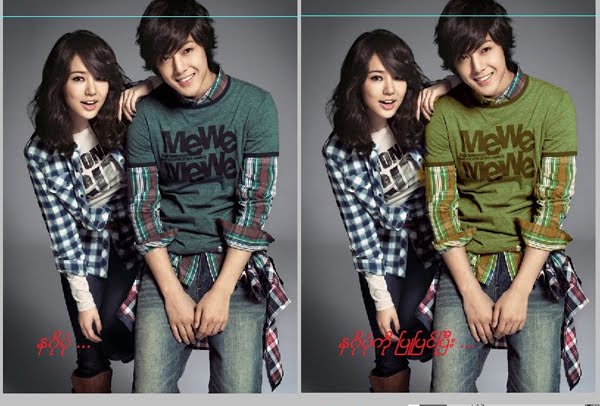
Changing shirt color in cs 5


Photoshop tutorials မ်ားကို ေနာင့္ပိုင္းဘေလာ့လ္ေပၚမွာ movie file ေတြ တင္ေပးမယ္လုိ႔ စိတ္ကူးထားတယ္။လက္တေလာ ကိုယ္တုိင္လည္း အားခ်ိန္ေလ့လာသမွ် ကို မွ်ေဝတဲ့သေဘာေလာက္နဲ႔ photo shop tutorial ebook ေတြကို တက္ႏုိင္သေလာက္ ကိုယ္ႏုိင္သေလာက္ ေရးတင္ေပးမယ္လို႔ စိတ္ကူးရွိပါတယ္။ခုလည္း cs 5 သံုးခုိက္ဆုိေတာ့ photo shop မွာ ကိုယ့္ေကာင္မေလး ေကာင္ေလး အက်ီအေရာင္ေတြ ေၿပာင္းၾကည့္ရေအာင္။အရင္ဆံုး cs 5 exe or cs 5 portable ကိုဖြင့္လုိက္ပါ။ၿပီးလ်ွင္ open file ကေန Open ကေန ေၿပာင္းလို edit လုပ္လုိေသာ ပံုတစ္ပံုကို ထည့္လုိက္ပါ။(သိၿပီးသား လူမ်ားက လႊယ္ကူပါလိမ့္မယ္။)


ဒါက File ကေန ပံုတစ္ပံုကို ေရႊးခ်ယ္ၿပီး အကယ္လို႔ ပံုက pixels(screen resolution)ေသးတယ္ ထင္လွ်င္ Image ကေန Image Size .. ကေန ပံုကိုၾကီးေအာင္ pixels သတ္မွတ္ခ်က္ထပ္ေပးလိုက္ပါ။

ၿပီးလွ်င္ photo shop cs 5 ေတြက tools bar မွရွိတဲ့ ၿပထားေသာ Quick Selection Tool W ကိုေရႊးေပးလိုက္ၿပီး ကၽႊန္ေတာ္ၿမွာၿပထားတဲ့အတိုင္း အက်ၤီကို select လုိက္ဆြဲေပးလိုက္ပါ။ဆြဲခ်င္ေသာ size ကိုအေပၚမွာ 29 သတ္မွတ္ထားတဲ့ေနရာမွာ ၿပင္လိုက္ပါ။အၿပာၿပထားသည္က - ကိုၿပထားၿခင္းၿဖစ္သည္။အဲ့ဒါကို ႏွိပ္မိလွ်င္ ဆြဲလို႔ရမည္မဟုတ္ပါ။ေနာင့္တစ္ဆင့္ ဆက္သြားရေအာင္။

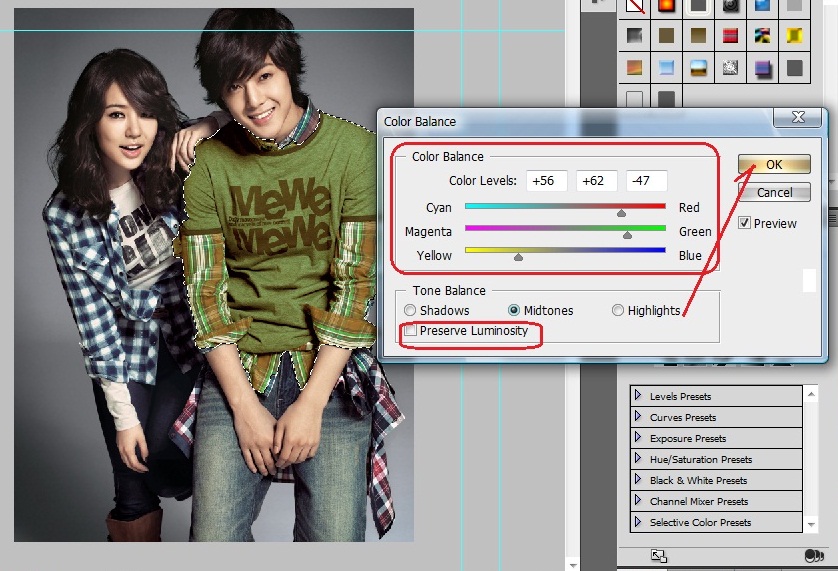
ၿပီးလွ်င္ ၿပထားေသာ Menu bar ကေန Image ကေန Adjustment ကေန Color Balance .. ကိုသြားလိုက္ပါ။

ၿပီးလွ်င္ Color Balance မွာ color levels ပံုကိုၾကည့္ပီးညိွေပးပါ အေရာင္ကို ၿပီးလွ်င္ Midtones (အလည္လတ္ေလာက္ပဲထားပါ) ၿပီးလွ်င္ Preserve Luminosity ကို အမွန္ၿခစ္ၿဖဳတ္ေပးလုိက္ပါ။ကိုယ္ ႏွစ္သက္ သလို ၿပင္ေပ့ါ။ၿပီးလွ်င္ OK ကိုေပးလုိက္ပီး Save မွာ save ေပးလိုက္လွ်င္ နဂိုပံုက ေၿပာင္းသြား မွာၿဖစ္ပါတယ္။ပံုအသစ္လုိခ်င္လွ်င္ေတာ့ Sav as မွာ file name and save as type .. မွာ .jpg သတ္မွတ္ ေပးလိုက္လွ်င္ ပံုတစ္ပံုရပါၿပီ။အဆင္ေၿပပါေစဗ်ာ။cs 5 မရွိလွ်င္ blogger Categories မွာ Graphic Edition မွာ ရွာၾကည့္လုိက္ပါ။
ဒီပို႔စ္ကို PDF FILE လုိခ်င္ရင္

Wednesday, January 26, 2011

Adobe photoshop cs5 extended


ေရးေပးခ်င္တာကေတာ့ မ်ားပါတယ္။လက္တေလာ မ်က္လံုးက စာၾကည့္တာမ်ားလို႔လားေတာ့ မသိဘူး နီလာတယ္ေနာင့္ပိုင္း။မ်က္မွန္ေလး ေဆာင္ထားရတယ္။ အဲ့ေတာ့ခုလည္း ကိုယ့္ဘေလာ့လ္လာ မိတ္ေဆြေတြကို Adobe Photoshop CS5 Extended တင္ထားေပးတယ္။သူရဲ႕ဝယ္သံုးရတဲ့ ေစ်းႏူန္းကို အရင္ဖတ္ၾကည့္လိုက္ပါ။


Pricing and Availability
Adobe Photoshop CS5 and CS5 Extended are scheduled to ship within 30 days with availability through Adobe Authorized Resellers, the Adobe Store and Adobe Direct Sales. Estimated street price for Adobe Photoshop CS5 is US$699 and US$999 for Photoshop CS5 Extended. Upgrade pricing and volume licensing are available. For more detailed information about features, OS support, upgrade policies and pricing, please visit www.adobe.com/go/photoshop.
US$999 for Photoshop CS5 Extended လို႔ေ၇းထားပါတယ္။ကဲဝယ္သံုးမလား?ကၽႊန္ေတာ္ ေပးသလိုေအာက္က crack file ႏွစ္ဖိုလ္ 32 bit and 64 bit ကုိ crack ေၿဖၿပီးသံုးမလား?ဆက္ဖတ္လိုက္ၾကည့္လိုက္ပါ ဘယ္ေလာက္ hard ware require ment ေလာက္ရွိ သံုးလို႔ရမလည္းေပါ့။
Minimum system requirements
Windows®

• 2GHz or faster processor*

• Microsoft® Windows® XP with Service Pack 3, Windows® Vista® Home Premium, Business, Ultimate, or Enterprise with Service Pack 2, Windows® Vista® 64-bit or Windows® 7

• 1GB of RAM or more recommended

• 1GB of available hard-disk space for installation; additional free space required during installation (Photoshop CS5 cannot be installed on flash-based storage devices.)

• 1,024x768 display (1,280x800 recommended) with qualified hardware-accelerated OpenGL® graphics card, 16-bit color and 256MB VRAM

• DVD-ROM drive

• Some 3D features in Adobe Photoshop Extended require an OpenGL 2.0 capable graphics card with at least 256MB of VRAM (512MB VRAM is recommended)

• Shader Model 3.0
Minimum system requirements
Windows®

• 2GHz or faster processor*

• Microsoft® Windows® XP with Service Pack 3, Windows® Vista® Home Premium, Business, Ultimate, or Enterprise with Service Pack 2, Windows® Vista® 64-bit or Windows® 7

• 1GB of RAM or more recommended

• 1GB of available hard-disk space for installation; additional free space required during installation (Photoshop CS5 cannot be installed on flash-based storage devices.)

• 1,024x768 display (1,280x800 recommended) with qualified hardware-accelerated OpenGL® graphics card, 16-bit color and 256MB VRAM

• DVD-ROM drive

• Some 3D features in Adobe Photoshop Extended require an OpenGL 2.0 capable graphics card with at least 256MB of VRAM (512MB VRAM is recommended)

• Shader Model 3.0


အရင္ဆံုုး Set-up file ကုိ installation ကို trial version (ယာယီသံုးရေအာင္) run ေပးလိုက္ပါ။ၿပီးလွ်င္ Select Language မွာ install လုပ္ခ်င္ေသာ language ကို ေရႊးထားေပးလုိက္ပါ။ပံုမွန္ English ပဲထားေပးလိုက္ပါ။


ADBE_CRACK - 32bit ဆိုတဲ့ amtlib.dll ဆိုတဲ့ဖုိင္လ္ကို(ဆိုလုိတာက ဝင္းဒိုး 32 bit သမားမ်ား သို႔မဟုတ္လည္း 64 သမားမ်ားက ႏွစ္သက္၇ာကို extract here ေပးၿပီး ) amtlib.dll ဆိုတဲ့ dll file ကုိ ၿပထားေသာ Adobe Photoshop cs 5 ကုိ r click / properties ကေန Open File Location ကိုသြားလိုက္ပါ။ၿပီးလွ်င္ Copy and replace အစားထုိးေပးလုိက္ပါ။ဒါဆို အဆင္ေၿပပါလိမ့္မယ္။Extended ဆိုတာ ေရာင္းခ်ေသာ edition ပါ။ကဲ အဆင္ေၿပပါေစဗ်ာ။ဒါဆို သံုးလို႔ရပါၿပီ။ကဲ ဝယ္သံုးမလား ေဒါင္းသံုးမလား ဆိုတာ ကိုယ္တိုင္ဆံုးၿဖတ္ေပါ့

Friday, January 21, 2011

Ulead PhotoImpact12[FULL]


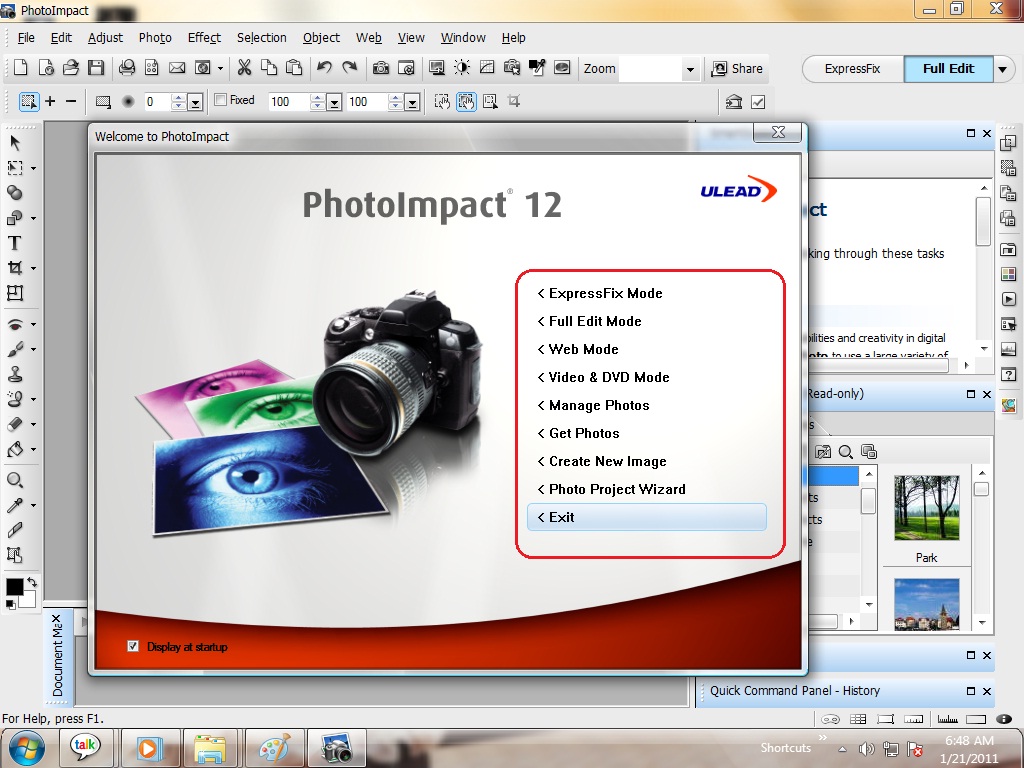
Photo ေတြကို effects ကိုင္ဖို႔ ဘယ္လို application ေတြနဲ႔ effects ပိုင္းေတြ edit လုပ္ဖို႔ adjustment ညိွဖို႔ ဆို လွ်င္ဘယ္လုိ software နဲ႔ကိုင္ရင္ေကာင္းမလည္းဆုိအရင္ကလည္း ၾကားဖူးေလာက္မွာပါ။Ulead ကေန produce edition တစ္ခုေလာက္ multi ထြက္လာတဲ့ PhotoImpact 12 ကို torrent ကေန တင္ထားေပးတယ္။အမွန္ေတာ့ ဒီေကာင္ေလးကုိ တင္ေပးခ်င္တာၾကာပီ။အရင္က key gen နဲ႔တင္ေပးမလို႔ ဒါေပမယ့္ full version မၿဖစ္တာကိုေတြ႕၇တယ္။ခုလည္း ဝယ္သံုးမွ ရမယ့္ၿဖစ္တဲ့ PhotoImpact 12 ကို torrent ကေန တစ္ခုေလာက္သြားေတြ႕တယ္။ဘာ serial key / crack /.reg file / patch အစားအစား full ၿဖစ္ေအာင္ လုပ္တဲ့ system files ေတြမလိုဘူး။Installation သာလုပ္တာနဲ႔ တန္းၿပီး full version ၿဖစ္တယ္။PhotoImpact 12 နဲ႔ တင္ေပးၿပီးေနာင့္ပိုင္း photo ေတြကို edit ပုိင္းေတြ effects ပုိင္းေတြနဲ႔ otherPhotoImpact 12 tools ပုိင္းေတြ သံုးနည္းကို basic ebook ေတြကို တက္ႏုိင္သေလာက္ ေရးဖို႔ေတာ့ စိတ္ကူးရိွတယ္။ကိုယ္တုိင္လည္း သံုးသလုိ ကိုယ့္ဘေလာ့လ္လာ မိတ္ေဆြမ်ားကိုလည္း သံုးရေအာင္ PhotoImpact 12 ကုိ muti upload ကပဲ sharing ေပးထားလုိက္တယ္။အ့ဲေတာ့ download ရယူလုိက္ပါ။ခုကေတာ့ သံုးေကာင္းေလာက္မယ့္ tools ပုိင္း အမ်ားစုကို ညႊန္းထားေပးလိုက္မယ္။


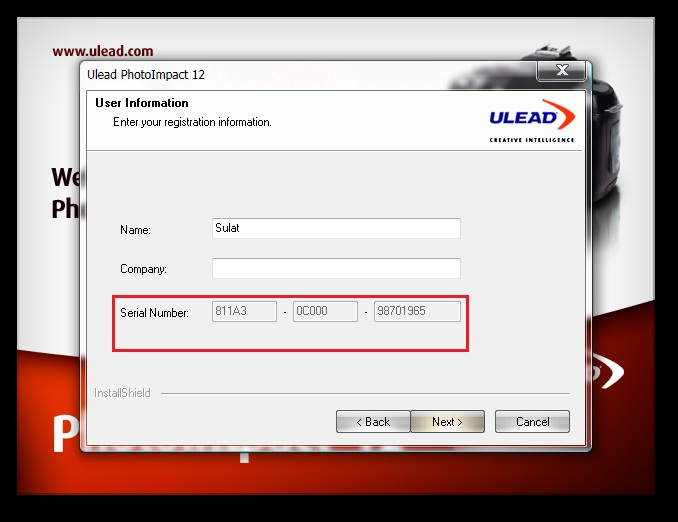
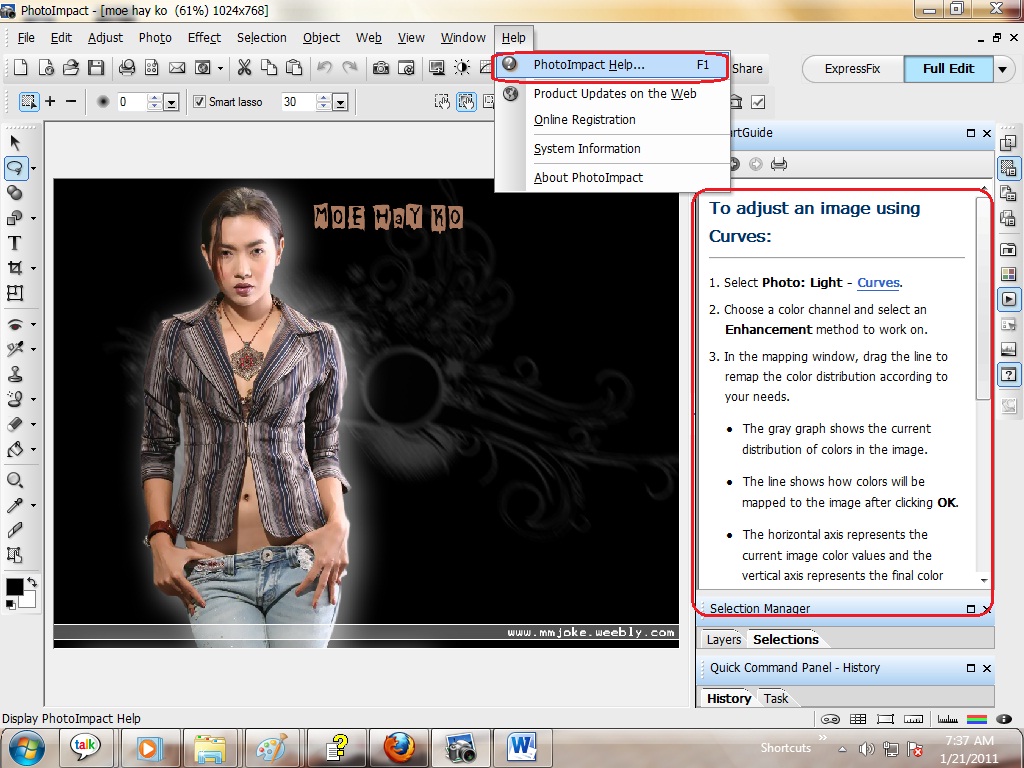
ေနာင့္ တစ္ခုက ခု ဘေလာ့လ္ပို႔စ္ေတြမွာ link ညႊန္းတာေတြ အလုပ္မလုပ္ဖူးၿဖစ္ေနတယ္။ဒါကလည္း ပို႔စ္ေတြကုိ .xml file ေၿပာင္းထားလို႔ ေနာင့္ပိုင္းအားသမွ် အခ်ိန္မွာ ၿပန္ပီး လုပ္ထားေပးမယ္။ဒီရက္ပိုင္း အတြင္း သည္းခံသာ ဖတ္ေပးထားပါ။ၿပီးေတာ့ download link ေတြက ေတာ့ အလုပ္လုပ္ပါတယ္)မလုပ္တ့ဲ link ေတြမရိွလည္း cbox ကေနသာ ေၿပာခဲ့ေပးပါ။အေပၚမွာ ၿပထားသလိုေပါ့ installation ေပးကတည္းက key ကၿဖည့္ေပးၿပီးသား။ကဲ ဆက္လက္ၾကည့္လိုက္ဦးဗ်ာ။ PI 12 Install (မွတ္ခ်က္ PI 12 Install ကို install ေပးလုိက္ပါ)


ၿပထားတာေတာ့ လက္၇ွိ impact 12 ကေန သံုးေကာင္းေလာက္မယ့္ express tools ပုိင္းေတြပ့ါ။

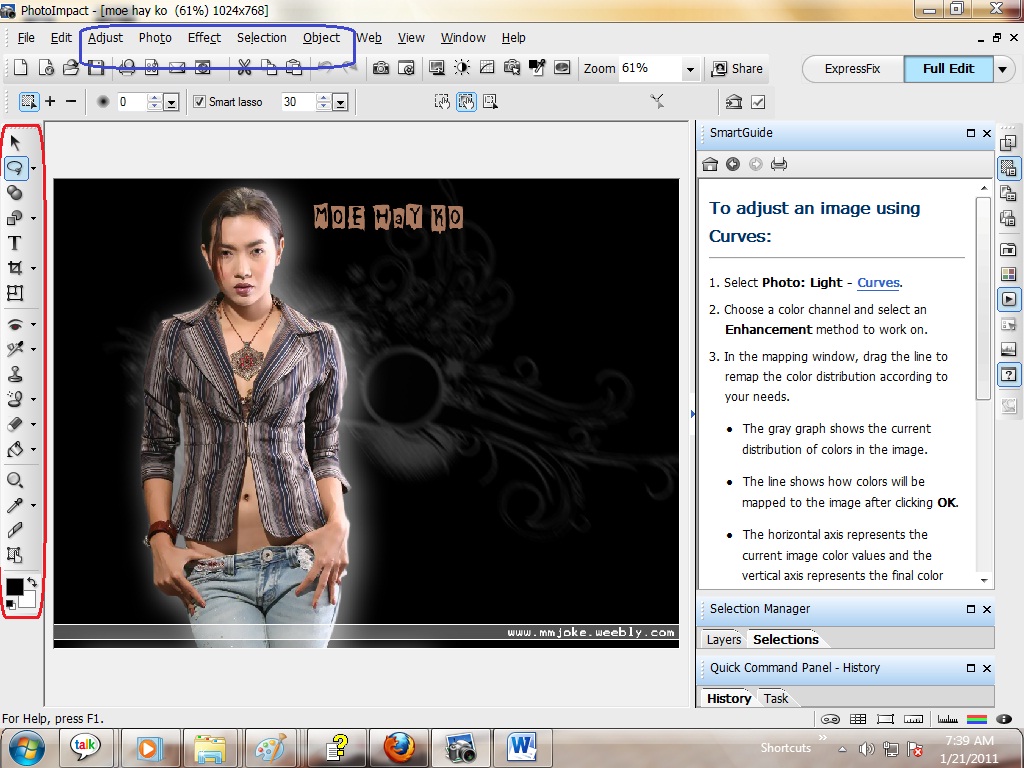
ဒါေတြကေတာ့ ၿပထားေတာ့ photo impact ကေန ညႊန္းထားၿပီး ဖတ္လို႔ရမယ့္ tutorials မ်ား ၿဖစ္ပါတယ္။ထပ္ၾကည့္လုိက္ဦးဗ်ာ။

ၿပထာေသာ ေနရာမ်ားသည္ blue ညႊန္းထားတာက သံုးလို႔၇မယ့္ photo ပုိင္းေတြကို သံုေကာင္းေလာက္မယ့္ menu setting ပိုင္းေတြၿဖစ္တယ္။ေဘးကညႊန္းထားေသာ red ကေတာ့ ဓတ္ပံုေတြကို (effects ေလာက္တစ္ခု ေလာက္ကိုင္ၿပီးမွာ ၿပန္ပီး edit လုပ္ႏုိင္မယ့္ horizontal tool group ပုိင္းၿဖစ္တယ္။
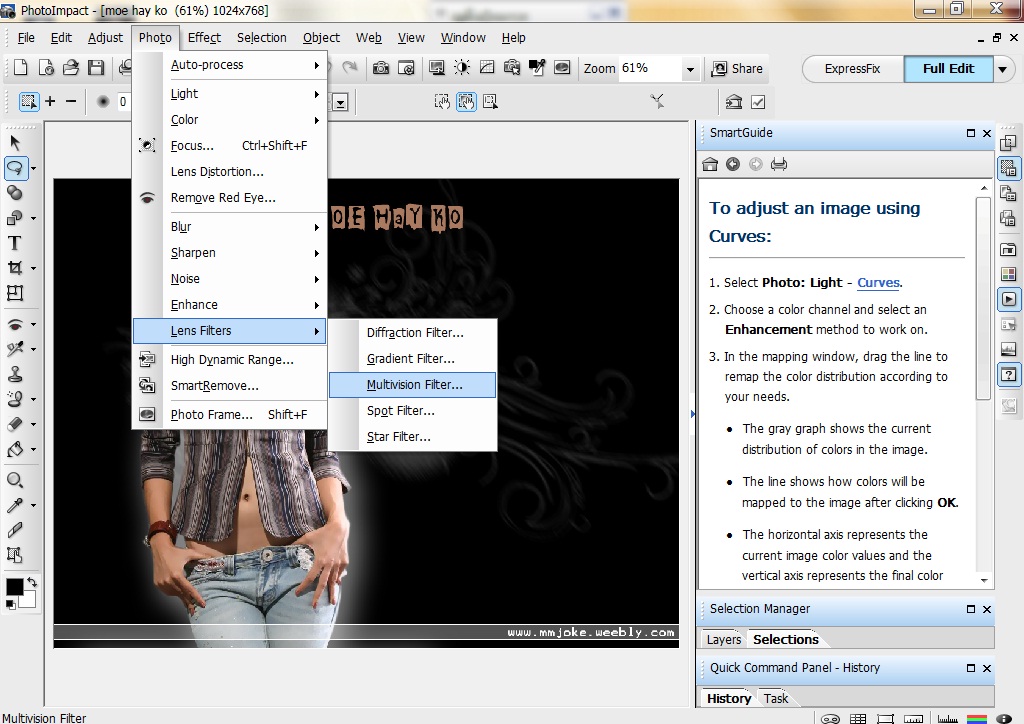
အရင္ဆံုး moe hay ko ကို muti ပြားၿပီး မ်က္ႏွာ skin ကို ဝေအာင္လုပ္ၿပထားတဲ့ ပုိင္းကို စေရးပါ့မယ္။

Photo ကို multi ပြားမည္ၿဖစ္လို႔ သြားလိုက္ပါ Photo ကေန Lens Filters/ကေန Multivision Filter .. ကုိိသြားလိုက္လွ်င္ ေအာက္မွာ ၿပထားသလိုေပါ့။ေမွာင္ေနတယ္ထင္လွ်င္ သို႔မဟုတ္ constract (ၿပတ္သားမွု နည္းလွ်င္ သြားလိုက္ပါ Adjust ကေန Adjust process ၇ိွလိမ့္မယ္ ညိွေပးလိုက္ပါ။ေအာက္မွာ လက္ရွိ edit လုပ္ထားတာကေတာ့

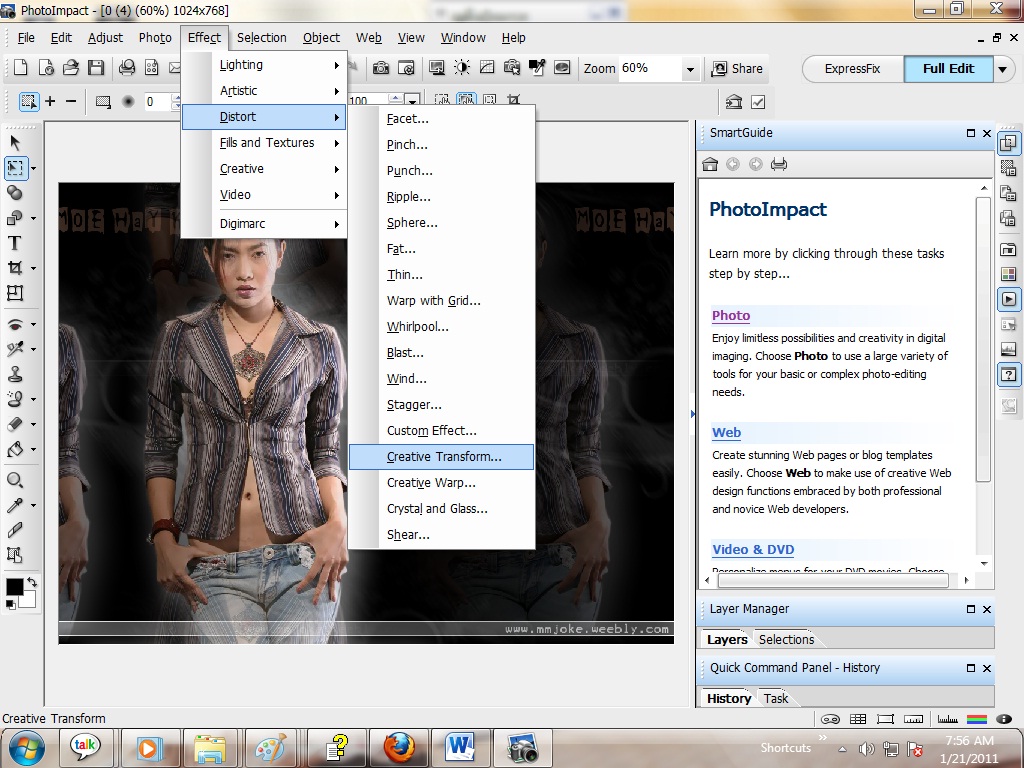
ကဲမ်က္ႏွာ skin ကုိ ဝေအာင္ ၿပင္ၾကရေအာင္။

သြားလိုက္ပါ Effect ကေန Distort ကေန Creative Transform ကုိသြားၿပီးေအာက္မွာ ၿပထားသလိုေပါ့

ၿပထားေသာ စက္ပိုင္းလိုက္ပီး မ်က္ႏွာကို ဝေအာင္ လုပ္ၾကည့္ပါ။အေပၚမွာ နမူနာလုပ္ၿပထားေပးထားသည္ ၾကိဳက္ႏွစ္သက္ရာ skin fat ကိုရလွ်င္ေတာ့ OK ကိုေပးလုိက္ၿပီး save as မွာသာ .jpg or jpeg file type နဲ႔သာ saving ေပးလုိက္ပါ။ဓတ္ပံုကို ၿပင္မယ္ဆုိလွ်င္ photo impact ကေကာင္းမေကာင္းဆုိတာ ကိုယ္တုိင္ဆံုးၿဖတ္ေပါ့။အသံုးဝင္ပါေစဗ်ာ။
ဒီပို႔စ္ကို PDF FILE လုိခ်င္ရင္

Sunday, January 9, 2011

AP_CS5_Extended_12.0_PORTABLE_


Adobe Photoshop CS5 Extended v12.0 FINAL Portable တစ္ခုေလာက္ တင္ေပးမလုိ႔။လုိအပ္ရင္သံုးရေအာင္ပါ။ကိုယ္တုိင္လည္း ဘာရယ္ေတာ့ မဟုတ္ဘူး torrent ကေန ေဒါင္းလုိက္တာနဲ႔ ကိုယ့္ လူမ်ားလည္း သံုးစြဲႏိုင္ေအာင္ပါ။Extended ဆုိတာ ေရာင္းခ်တဲ့ edition ပါ။Portable ဆိုေတာ့ လြယ္လင့္တကူ သံုးစြဲလုိ႔ရမွာ ၿဖစ္သလို .exe file installation ေပးတာ ထက္ေတာ့ အားနည္းခ်က္ အနည္းငယ္သာ ကြာဟသြားပါတယ္။Multi upload ကပဲ sharing ေပးလိုက္တယ္။


ေပးထားေသာ Adobe Photoshop CS5 Extended v12.0 FINAL Portable ကို extract here ေၿဖေပးလိုက္ၿပီး Photoshop_Portable_12.0_en-fr-de-es-it-ru-zh-tw.paf ကို double click ေခါက္ၿပီး သံုးလိုေသာ tool တစ္ေနရာကို သတ္မွတ္ေပးလုိက္ပါ။အေပၚမွာ ၿပထားပါတယ္။ေအာက္မွာက details ကို အနည္းငယ္ေလာက္ ဖတ္ရူပီးမွ ေဒါင္းယူလိုက္ပါ။


System requirementsသံုးရေသာ hard wares requirement ေတာင္းဆိုမွဳမ်ား Adobe Photoshop CS5 Extended v12.0 FINAL Portable နဲ႔စပ္စပ္ၿပီး

Windows:

Processor Intel Pentium 4 or AMD Athlon 64
Windows XP with Service Pack 3; Windows Vista Home Premium, Business, Ultimate, or Enterprise with Service Pack 1 (Service Pack 2 recommended) or Windows 7
1 GB of RAM
1 GB of free hard disk space for installation; additional free space required during installation (can not install on removable flash storage devices)
??? Screen resolution of 1024x768 (recommended 1280x800), video card with support for OpenGL 2.0, hardware acceleration and 16-bit color, 256 MB VRAM
Some GPU-accelerated features require graphics support for Shader Model 3.0 and OpenGL 2.0
DVD-ROM drive
Software QuickTime 7.6.2, required for multimedia features
Broadband Internet connection required for online services

Mac OS:

Multicore Intel processor
Mac OS X v10.5.7 or v10.6
1 GB of RAM
2 GB free hard disk space for installation; additional free space required during installation (not installed on the drive where the file system is case-sensitive, or on removable flash storage devices)
Screen resolution of 1024x768 (recommended 1280x800), video card with support for OpenGL 2.0, hardware acceleration and 16-bit color, 256 MB VRAM
Some GPU-accelerated features require graphics support for Shader Model 3.0 and OpenGL 2.0
DVD-ROM drive
Software QuickTime 7.6.2, required for multimedia features
Broadband Internet connection required for online services.
ဒီပို႔စ္ကို PDF FILE လုိခ်င္ရင္


Sunday, November 7, 2010

Mytoolsoft Watermark Software 2.7.2 + serials


ကၽႊန္ေတာ္တို႔ေတြ ခ်စ္သူ၇ည္းစားေတြ ၿဖစ္ၾကတယ္ေလ။အဲ့ေတာ့ တစ္ခုေလာက္ စဥ္းစားမိတယ္။ကိုယ့္ ခ်စ္သူမိန္းကေလး ေတြကို ကုိယ့္ပံုေလးနဲ႔ cover sheet သုိ႔မဟုတ္လည္း တၿခားေသာ ဓတ္ပံုဆုိင္ေတြမွာ ကိုယ့္ ပံုနဲ႔ မိန္းကေလးပံုကို ထပ္ၾကည့္မလို႔။ဆုိလုိတာက Microsoft word သံုးဖူးလွ်င္ watermark ထည့္တယ္ဆုိတာ ၾကားဖူးလား?အဲ့က water mark ထည့္တာနဲ႔တူတူပဲ။ခုလည္းMytoolsoft Watermark Software 2.7.2 ကုိသံုးၿပီး watermark ဓတ္ပံုေတြကို shadow အ၇ိပ္ပြားၿပမလို႔။Mytoolsoft Watermark Software 2.7.2 ကို serial key နဲ႔တင္ထားေပးတယ္။Serial by phoothar က key သာထည့္ေပးလုိက္ full version ၿဖစ္ပီးအဆင္ေၿပမွာပါ။Installation လုပ္ဖို႔ download link ေပးထားပါတယ္။သံုးနည္းက လြယ္ပါတယ္။အသံုးဝင္မွဳမဝင္မွဳဆုိတာက user ေပၚပဲမွဳတည္မွာပါ။


လြယ္ပါတယ္ ဒီေကာင့္ကို Select Pictures မ်ားမွာ ကိုယ့္ folder လုိက္ထည့္မလား (သို႔) ပံုတစ္ပံုခ်င္းဆီေရႊးထည့္မလားေပါ့။ၿပီးလွ်င္ Watermark Setting မွာ ၿမင့္ၿမတ္ပံုကို pointer ၿပထားေပးပါသည္။ကိုယ္ႏွစ္သက္၇ာ water mark shadow ကို Select.. ကေနေရႊးထည့္လုိက္ပါ။ဝိုင္းၿပထား ေသာေန၇ာသည္ ၿမင့္ၿမတ္ပံုကို ေန၇ာအထားအသို ၿဖစ္သည္။ၿပီးလွ်င္ Opacity ကေန ၿမင့္ၿမတ္ photo resolution အနည္းအမ်ားကို ခ်ိန္ၾကည့္ပါ။ႏွစ္သက္တယ္ဆိုမွာ Click here to apply water mark ထည့္ေပး၇ံုပဲ။ကိုယ္တုိင္လုပ္မယ္ဆုိေတာင္ အဲ့ေလာာက္ခက္ခဲမွာ မဟုတ္ပါဘူး ကၽႊန္ေတာ္ေၿပာၿပေနတာ ထက္ေပ့ါေလ။Your water mark Text မွာေတာ့ တစ္ခုခု၇ိုက္ထည့္ေပးေပါ့။ကိုယ္ႏွစ္သက္၇ာေပါ့။ၿမန္မာလုိ ေပၚခ်င္၇င္ေတာ့


Font မွာ font ကို Zawgyi-One ေ၇ႊးခ်ယ္ေပးလိုက္ပါ။Size မွာေတာ့ font size ေပါ့ စာလံုးအၾကီးအေသးပါ။Shadow /font ကုိ shadow ထည့္တာ။Italic font က text ကို ေစာင္းေ၇းတယ္လို႔ ပဲေၿပာ၇မွာပါ။Margin ကေတာ့ height and width သတ္မွတ္ေပးတာပါ။Opacity ကေတာ့ font ကို အေပၚမွာ ေၿပာသလိုဘဲ resolution ၿမင့္တင္တာပါ။ဆိုလိုတာက ေ၇းလုိက္ေသာ စာကို မွိန္ or မမွိန္ ခ်ိန္ညိွတယ္ ဆုိ၇မွာပဲ။အေပၚမွာေၿပာသလို Click here to apply water mark ကိုသာ ႏွစ္သက္တဲ့အခါမွာ သာ ႏွိပ္ေပးလုိက္ေပါ့။ဒါဆုိ auto saving ေပးလုိက္ၿပီး ထုိပံု output ထြက္၇ာ ေန၇ာကိုေ၇ာက္သြားမွာ ၿဖစ္ပါတယ္။Picture file type ကေတာ့ .jpg file type နဲ႔ထြက္လာမွာပါ။ဘယ္လုိၿဖစ္ၿဖစ္ serial key ထည့္၇ံုနဲ႔ ဝယ္သံုးစ၇ာမလုိေတာ့ မသံုးၿဖစ္ေတာင္ သံုးၿဖစ္တဲ့လုပ္ငန္းခြင္ေတြမွာ အသံုးတည့္မွာပါ။အဆင္ေၿပပါေစ fri/
ဒီပို႔စ္ကို PDF FILE လုိခ်င္ရင္


Ulead® VideoStudio® 11.5 Plus+Crack-HeartBug

ေတဇာထြန္း50:ေကာင္ေလး မင္းမွာ Ulead® VideoStudio ေလး၇ိွလား


ကဲသူငယ္ခ်င္းေရ Ulead® VideoStudio® 11.5 Plus+Crack-HeartBug ကိုေတာ့တင္ထားေပးတယ္။Crack file နဲ႔ဆုိေပမယ့္ ေဒါင္းတာၾကည့္သေလာက္ေတာ့ torrent search engine ကေနေလ ဒီေကာင္က path 1*2 ဆိုၿပီးလာတာ။ဒါေပမယ့္ လုပ္ၾကည့္ရသေလာက္ေတာ့ full version ၇ေအာင္လုိ႔ေပါ့ အဆင္မေၿပဘူး။ဒါေပမယ့္ set up file ကုိ installation အ၇င္ေပးလုိက္


ၿပီးမွ HotFix01 ဖုိင္လ္ထဲကဟာကုိ fix update ၿဖစ္ေအာင္ installation ေပးလုိက္ဒါဆုိ set up file ၿပီးလို႔ short cut ulead video studio က ဘာကီးမွမေတာင္းပဲ သံုးရတာ အဆင္ေၿပပါလိမ့္မယ္။Version ကေတာ့ 11.5 ေပါ့။Lastet version မဟုတ္ေသဘူး။ဒါေပမယ့္ torrent ကေန ေဒါင္းၾကည့္၇သေလာက္ေတာ့ ဒီေကာင္က lastest ပဲ။သူ႔ေနာင့္မွာ 10.5 တို႔ 10.1 တို႔ရိွေသးတယ္ အဆင္ေၿပပါေစ သူငယ္ခ်င္း။သံုးနည္းကေတာ့ ကိုယ္တုိင္ လုပ္ၾကည့္ေပါ။က်န္သူမ်ားလည္း သံုးလို႔ရေအာင္ တင္ေပးထားတာပါ။Torrent link ကုိတာ့ မညႊန္းေပးေတာ့ဘူး။လက္၇ိွေတာ့ ကုိယ္တုိင္ upload link ကမွ multi upload ကေန တင္ထားေပးလုိက္တယ္။အဆင္မေၿပလွ်င္ comment box မွာထပ္ေထာင့္ ခဲ့ေပးပါ။အဆင္ေၿပပါေစ fri:Notice/path file 2 ခုကို မေၿဖပါနဲ႔။

ဒီပို႔စ္ကို PDF FILE လုိခ်င္ရင္

Tuesday, November 2, 2010

AMS Software Photo Effects 2.65 + serial

အရမ္း၇ိုးရွင္းတဲ့ photo effects ေတြထည့္ၿပမလို႔။ေတာ္ေတာ္ေလး မုိက္တယ္ လုပ္ရတာလြယ္တယ္ တစ္ခါ ေလာက္ စမ္းၾကည့္လိုက္ရင္ကို တက္ေနပါပီ။ခုကၽႊန္ေတာ္မေၿပာခင္ကို ကလုပ္တက္ေနပီ ဟီး ပိုတယ္ေတာ့ မဟုတ္ဘူး။ဒီေကာင္က မုိက္တယ္ ၿပီးေတာ့ သံုးရတာ သက္သာတယ္ လႊယ္ကူတယ္ ဒါထက္ ၾကိဳက္ႏွစ္သက္မိတာက ဒီေကာင္ရဲ႕ effects transitions ေတြပါဘဲ။Serial key နဲ႔တင္ထားေပးတယ္။ဘာ ေၾကာင့္ေပးလည္း ေတာ့မေၿပာနဲ႔ေတာ့ buying ဝယ္သံုးခုိင္းတာေလ ဒီေကာင္နဲ႔ license သေဘာတူေပးလုိုက္ ဒါဆုိသံုးလုိ႔ရၿပီ အရုိးရွင္းဆံုး effects ေတြ ကိုင္ၿပလုိက္မယ္။Application program အသံုးဝင္မဝင္ဆုိတာ ကိုယ္တုိင္ အသံုးၿပဳေပၚမွဳတည္ပါတယ္။ခုေပးတဲ့ AMS Software Photo Effects 2.65 + serial [dazz1][h33t] နဲ႔တင္ ကိုယ့္ computer ကပံုေတာ္ေတာ္မ်ားမ်ားကို calendar ဒီဇုိင္းထြင္ရင္ ထြင္တက္သလို ၇တယ္။ဒါကေတာ့ ကိုယ္ပုိင္ေလ့က်င့္မွု already use to ေလ။ဘယ္လုိၿဖစ္ၿဖစ္ စမ္းသံုးၾကည့္ေပးအံုး။


ကၽႊန္ေတာ္ေပးတဲ့ seril number ေပးလုိက္လွ်င္ကို trial version ယာယီသံုးေပ်ာက္သြားမွာၿဖစ္တယ္။လက္၇ိွ ကၽႊန္ေတာ္စမ္းသေလာက္ေတာ့ အဆင္ေၿပတယ္။တစ္ခုေလာက္ ေတာင္းဆုိပါရေစဗ်ာ။ကၽႊန္ေတာ္ soft ware ေတြကို upload link ကေန share ေပးထားတာကို ေဒါင္းပီးမွ ၿပန္တင္ပါ။Softwares ေတာ္ေတာ္မ်ားမ်ားက phoothar name ေတြနဲ႔မုိ႔လု႔ိပါ။ကၽႊန္ေတာ့္ဆုိဒ္က ၾကိဳက္သလုိ copy and past လုပ္ပါ။တၿခားဆုိဒ္မ်ားမွ ေမာင္ႏွမမ်ားလည္း ဘယ္လုိၿဖစ္ၿဖစ္ေပါ့ source ေလးတစ္ခုေလာက္ ခံေပးပါလို႔။ဒါဆုိ အဆင္ေၿပတယ္ေလ ေလရွည္သြားတယ္။ဘယ္လုိၿဖစ္ၿဖစ္ ခုတင္ထားေပးတဲ့ ပံုမွန္ ကြန္ပ်ဴတာ user တစ္ေယာက္အေနနဲ႔ေတာင္ အသံုးၿပဳ၇ ေပ်ာ္ပါတယ္။ကိုယ္ရည္းစားပံုေတြကေတာ့ ကိုယ္တုိင္ လက္တက္စမ္းၾကည့္ၾကေပါ့ ဟီး။ေပးရတာ ကလည္း ၿပကၡဒိန္ သမားေတြနဲ႔ပိုကိုက္တယ္။Making calendar software တစ္ခုေတာ့ လိုတာေပါ့။ကၽႊန္ေတာ့္ ဘေလာ့လ္ widget/Categories/Making Calendar ေဆာ့ဝဲလ္တစ္ခုတင္ထားေပးတယ္။ဒီေကာင္က 12 လၾကိဳက္တဲ့ paper sheet and grounding effects ေတြထည့္လုိ႔ရတယ္။ပံုေတြလည္း light ness and darkness ခ်ိန္ညိွလို႔ရတယ္။


ဒါကအရိုးရွင္းဆံုး effect တစ္ခုကိုစမ္းသြားတာပါ။ဆ၇ာမကန္ေတာ့ ပြဲတုန္းကဆုိပါေတာ့။Open ကေန .jpg file types ပံုတစ္ပံုကိုေရႊးခ်ယ္ေပးလုိက္ပါ။All files သာေပးၿပီး ေရႊးခ်ယ္ေပးလုိက္ပါ။ဒါဆုိ other picture and photo file types ေတြေပၚပါတယ္။ကၽႊန္ေတာ့္ကို လုိက္ရွာၾကည့္ သိ၇င္မုန္႔ဝယ္ေကႊ်းမယ္။Effects/Decoration and Composition ဆိုတာ AMS Software Photo Effects 2.65 + serial [dazz1][h33t] ေဆာ့ဝဲလ္ရဲ႕ effects ေကာင္းမွဳေတြေပါ့။Scale ကေတာ့ apply ေပးလုိက္ေသာ effect ေတြရဲ႕ width and height ၿပန္႔သြားၿခင္းပါ။ဆုိလုိခ်င္တာက photo resolution ကို pixels မ်ားၿမွင့္တင္လုိက္ၿခင္းသေဘာပါ။Printer သမား မ်ားကေတာ့ Print ကေန output ထုတ္ယူေပါ့။Computer photo ယူလုိသူေတြ ကေတာ့ Save or Save as ကေနသာ ၾကိဳက္တဲ့ picture file types/.bmp/.jpeg or jpg/.tif/.gif and .png လက္တေလာ AMS Software Photo Effects 2.65 + serial [dazz1][h33t] မွာေတာ့ အဲ့ေလာက္ saving out file type ေတြေတြ႕ရတယ္။ေပ်ာ္ရႊင္စြာ အသံုးၿပဳႏုိင္ၾကပါေစ။


ဒီပို႔စ္ကို PDF FILE လုိခ်င္ရင္


Arcadia PhotoPerfect 2.90.117+Crack-


ဒီေကာင္ေလးကို နာမည္ဘယ္လုိေပးရမလည္း မသိဘူးဗ်ာ ဒီလုိ photo ေတြ graphic ပိုင္းေတြ အလွအပ effects စံုမွုေတြေတာ့ ဒီေကာင္ေလးက ေတာ္ေတာ္ေလး မိုက္တယ္လုိ႔ေၿပာရမယ္။ဒီလုိဗ်ာ brightness ေတြ လည္းညိွလို႔ရတယ္။လုပ္၇င္လုပ္သလုိ ေရွးခတ္ေၿပးေအာင္လည္းလုပ္လုိ႔ရတယ္။ဘယ္လုိၿဖစ္ၿဖစ္ full version ၿဖစ္ေအာင္လို႔ေတာ့ crack file ေတာ့ရွာထားေပးတယ္။ေတာ္ေတာ္ေလး လန္းလို႔။အသံုးဝင္မဝင္ဆုိတာက အသံုးၿပဳတဲ့ လူအေပၚမွုတည္ပါတယ္။Arcadia PhotoPerfect 2.90.117+Crack-HeartBug ဒီလုိေတာ့ upload sharing ေပးထားလုိက္တယ္။Download လုပ္လုိက္ဦး။


ဝင္းဒိုးတင္ထားတဲ့ partition အခန္း Program File မွာ crack.exe သာ copy and replace သာေပးလုိက္။အဆင္ေၿပမွာပါ။ဒါဆုိ crack ေၿဖပီးသြားေလာက္ပီ။


ဒါက photo perfect ရဲ႕အားသာခ်က္ effects sheet မ်ားေတြပါ။နည္းနည္းေလး သံုးၿပေပးမယ္။တဆင့္ၿခင္း ေတာ့ေရး မၿပေတာ့ဘူး။ကိုယ္တုိင္လုပ္ၾကည့္ရင္လႊယ္ပါတယ္။ကိုယ္တုိင္လုပ္ေစခ်င္တာပါ။


ဒါက Image bar ကေန အေပၚပံုကို နည္းနည္းေလာက္ ၿပင္ေပးၾကည့္တာ။က်န္ေတာ္ ၿပင္လုိက္မွ ၇ုပ္ဆိုးသြား လားေတာ့ မသိဘူး။ဘယ္လုိၿဖစ္ၿဖစ္ ၿပင္ရင္းၿပင္းရင္းနဲ႔ level ေတာ့တက္လာမွာပါ။ဘယ္လုိၿဖစ္ၿဖစ္ သံုးၾကည့္ၾကအံုးဗ်ာ။စမ္းေပ်ာ္ပါတယ္။ဒီ software နဲ႔ photo design ပုိင္းေတြမွာ အသံုးဝင္မွဳ တစ္ပုိင္းေတာ့ ပါေတာ့လာမွာပါ။ကဲ စမ္းသံုးၾကည့္ၾကအံုး။ပံုတစ္ပံု output ကေတာ့ ပံုသာ r click ေထာင့္လုိက္ save as သာေပးၿပီး ၾကိဳက္တဲ့ picture file types မ်ားနဲ႔သာ saving ေပးလုိက္ေတာ့။Printer သမားမ်ားကေတာ့ ကိုယ္တုိင္သာ printer ေဆးသာဝယ္ၿပီး A4size နဲ႔သာ direct ထုတ္လုိက္ေတာ့။အသံုးၿပဳ၇တာ အဆင္ေၿပပါေစ။


ဒီပို႔စ္ကို PDF FILE လုိခ်င္ရင္